 Rekon
RekonBring your Sniper orders with you, as they are
Rekon reads the Sniper orders export directly. Your customers, their history and your order statuses come across in one upload, with a preview before anything is saved.
How the move works
Export your orders from Sniper
Download the orders export as a CSV file. No editing needed.
Start your Rekon trial
Create your workspace, set your head office and delivery fees per state. It takes a few minutes and is free for 14 days.
Upload and preview
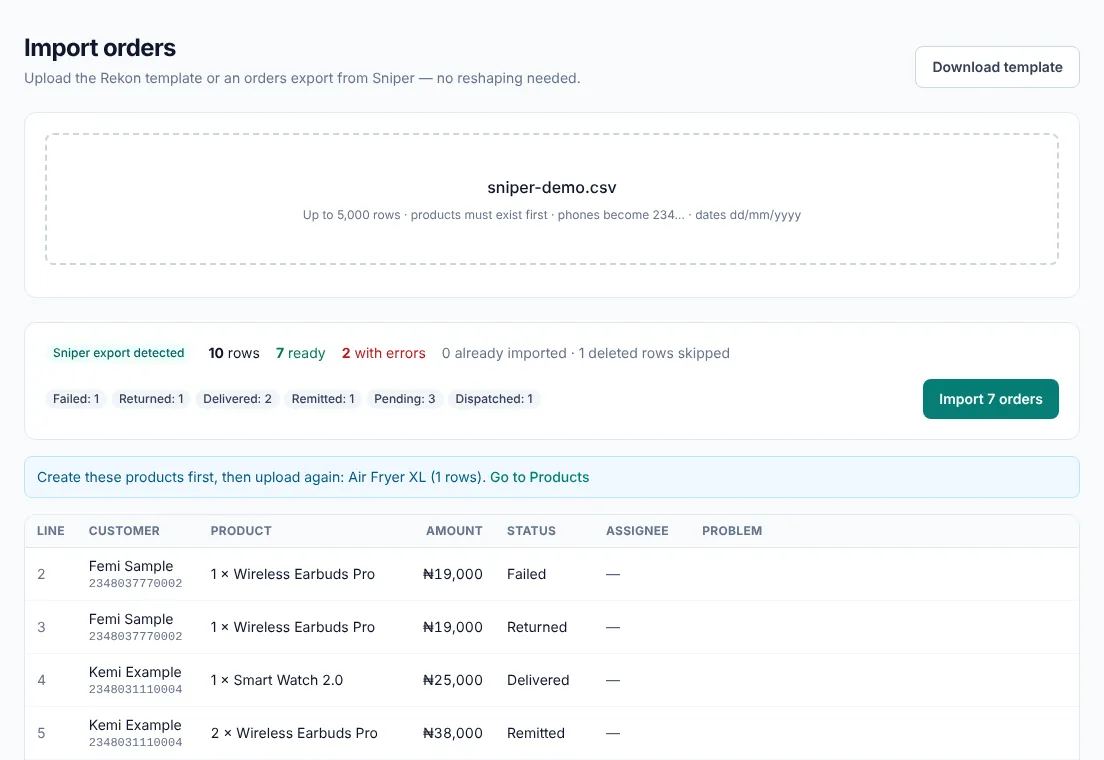
Rekon shows how many rows are ready, any rows with problems and any products you need to create first.
Import
Customers are matched by phone number, so a buyer’s history follows them. Statuses, dates and states are kept.
Enter opening stock and invite your team
Add what each location holds today, then invite reps and riders. New orders run in Rekon from here.
What comes across
- Customer names, phone numbers (tidied to one format) and addresses
- Products and quantities on each order, matched to your Rekon products
- Order status, order date and delivery state
- Order comments and the form each order came from
- The rep each order was assigned to, when they are on your Rekon team
- Rows that can’t be read are listed with the reason and skipped; the rest import
What you get after the move
Riders work offline and see the cash they hold. Stock is tracked with each rider and delivery partner. Cash is matched to your bank statement. Your income statement, cash flow and balance sheet come from the same records.
Plans are in naira, from ₦7,500 a month. See pricing.
Questions about moving
Do I have to change the Sniper export before uploading?
No. Upload the orders export as you downloaded it. Rekon recognises the layout and reads the columns it needs.
Will importing the same file twice create duplicates?
No. Orders already imported are recognised and skipped, so you can safely import an updated export again.
Does the import move my stock and cash?
No. Imported orders are your order history: customers, products, statuses and dates. Stock starts from the opening quantities you enter in Rekon, and cash starts from your first delivery recorded in Rekon.
Can I run both for a while?
Yes. Many sellers import their history, run new orders in Rekon for a week alongside their old process, and switch fully once the team is comfortable.
Your history comes with you
Free for 14 days, no card needed. Import your existing orders and see where your money is by this evening.